
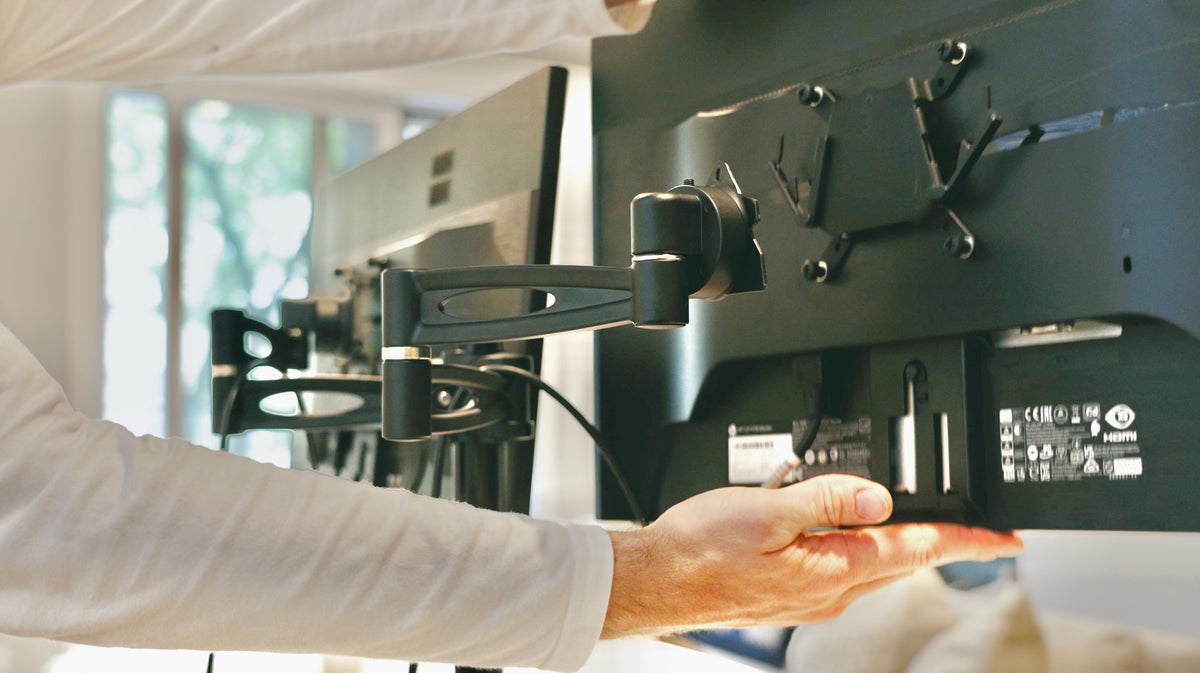
Mounting a screen on a fixed desk is simple. Mounting one on a standing desk is a different job, because the desktop travels up and down several times a day and the monitor arm has to go with it without pulling a cable tight or shifting under the movement.
Here is what to check on the desk, the arm and the screen before anything gets clamped.
Why an Arm Beats a Monitor Stand on a Moving Desk
A monitor stand sits on the desktop and eats depth. A monitor mount clamps to the edge and holds the screen out over the worksurface, giving that depth back.
On a height adjustable desk that matters twice over:
- Depth. A screen needs to sit roughly an arm's length away for comfortable viewing. On a shallow desktop a stand makes that impossible; an arm pushes the screen back and solves it.
- The teardown. A screen on an arm never gets handled. It travels with the desk, so raising and lowering the desk stays a one-button job rather than a lift.
That second point is the one that decides whether a sit stand desk keeps getting used. Anything that adds handling to the height adjustment reduces how often you do it.
Four Things to Check on the Desk
| Check | Why |
|---|---|
| A clear rear edge | A clamp needs an unobstructed lip. A rear crossbar or a cable tray at the edge blocks it |
| Desktop thickness | Most clamps take a specific range. Too thin and it slips, too thick and it will not close |
| Desk load rating | Arm plus screens count against the lbs the frame lifts. Use the operational figure |
| Frame rigidity | An arm is a lever. Any frame flex is amplified at the screen, especially at standing height |
The clear rear edge catches people most often. A desk advertised as monitor-arm compatible has been designed with that lip in mind, which is worth confirming rather than assuming.
Three Things to Check on the Screen
VESA pattern. Most monitors have four threaded holes on the back in a 75 by 75 or 100 by 100 millimeter square. That is the VESA standard, and the arm has to match it. Some slim and curved screens have no VESA holes at all and need an adapter plate.
Weight. Every arm quotes a range, not just a maximum. A screen that is too light for a gas-spring arm floats upward and will not stay put, which surprises people more than an overweight one.
Depth behind the screen. Curved and very deep monitors can foul the arm at full tilt. Check the tilt and rotation you actually want before buying.
| Mount type | Desktop space used | Adjustment | Best for |
|---|---|---|---|
| Factory monitor stand | Full base footprint | Tilt only, sometimes height | Deep desktops, one screen |
| Computer monitor stand or riser | Full footprint, raised | Fixed once placed | Adding height cheaply |
| Single monitor arm | A clamp at the rear edge | Height, depth, tilt, rotation | Compact desktops, moving desks |
| Dual monitor mount | One clamp, twice the load | Full on both screens | Multi-monitor work, wide desktops |
Single or Dual
A dual monitor mount holds two screens on one clamp point. It is tidier than two single arms and it concentrates all that weight and leverage into one spot on the desktop, so the rear edge and the frame have to be up to it.
A compact or narrow desk is usually better served by one screen on an arm than two crammed side by side. A dual monitor stand on a desktop that is too shallow pushes both screens closer than a comfortable viewing distance, which is the problem an arm was supposed to fix.
Converters Are a Different Product
When a riser is enough, and when it is not
Search results for a desk with monitor support mix in a lot of risers, so it is worth separating them.
A standing desk converter sits on top of an existing desk and lifts a worksurface and a keyboard tray. An electric standing desk converter does the same with a motor. Some ship as a standing desk converter with monitor posts built in, which means the screen position is fixed by the riser rather than adjustable on an arm.
The trade is straightforward. A converter is cheaper and needs no new desk, and it keeps your existing desktop depth, your existing seated height and your existing footprint. A height adjustable desk with a clamped monitor arm moves the whole worksurface and lets you set the screen independently.
For a laptop-only setup a converter is often enough. For a multi-monitor workstation it usually is not, because the riser's own posts rarely put two screens at a comfortable viewing position on a compact desktop.
Setting the Height Once
Get this right on day one and it stays right, because the arm holds the screen in the same relationship to the desktop at every height.
- Top of the screen near eye level when you are sitting upright
- Roughly an arm's length from your eyes
- Tilted back slightly, five to ten degrees, so the surface faces your face
- Keyboard and mouse in front, elbows at about 90 degrees
Awkward posture and poor workstation layout are among the risk factors NIOSH identifies in its guidance on work-related musculoskeletal disorders. A screen set too low is the most common version of it in a home office, and a monitor arm is the easiest fix because the adjustment is free once the arm is fitted.
Cables, Once the Screen Moves
An arm adds a second moving joint to the cable run: the desk travels, and the screen swings. Both have to have slack.
Run the power and video cables along the arm's own channel, then down the desk frame, gathering the slack in a single loop before the cable drops to the floor. Do it with the desk at its highest working height, so every lower position has slack by definition.
Why This Is Worth the Half Hour
The point of the setup is that changing position stays effortless. In the Take-a-Stand Project, published in Preventing Chronic Disease, office workers given sit-stand devices cut sitting time by 66 minutes a day and reported 54 percent less upper back and neck pain, and every gain disappeared within two weeks of the devices being taken away.
A screen you have to move by hand has the same effect as taking the desk away, just more slowly.
The Lillipad is built for this. Its desktop supports quick-install monitor arms, with single and dual monitor arms available separately, and the frame sits toward the back so the rear edge stays clear for a clamp. Working height runs 13.5 to 42 inches on the standard size and 13.5 to 48 inches on the large, with an operational load rating of 75 pounds to budget the arm and screens against.
Specifications and the full height ranges are on the electric standing desks page, and the single monitor arm lists its VESA fit and weight range.
Frequently Asked Questions
Can you put a monitor arm on any standing desk?
Only if the rear edge is clear and the desktop thickness falls inside the clamp's range. A rear crossbar, a fitted cable tray or a very thick top will each stop a standard clamp.
Does a monitor arm count against the desk's weight limit?
Yes. The arm and the screens are part of what the frame lifts, so add them to your total and compare it with the operational load rating rather than a static figure.
What is VESA and how do I find mine?
VESA is the standard hole pattern on the back of a monitor, usually 75 by 75 or 100 by 100 millimeters. Measure between the hole centers, or check the screen's spec sheet. Some screens need an adapter plate.
Is a monitor arm better than a monitor stand?
On a desk that moves, yes. The arm returns desktop depth, sets the viewing distance properly, and means the screen never needs handling when the desk changes height.
Upgrade Your Workspace With Lillipad, Order Today!
At Lillipad, we’ve reimagined the standing adjustable desk with the greatest ergonomic range ever. Our height-adjustable standing desks let you seamlessly switch between sitting and standing positions, so you can move freely and protect your posture.
- Products & Services: From home office setups to in-office standing desks, Lillipad offers electric sit stand desks, adjustable standing desks, and ergonomic desktops with integrated power and memory presets. Each model is designed with industrial-grade lifting columns, wide height ranges, and wood desktop finishes that fit any workspace.
- Quality & Comfort: Built in Milwaukee, WI, our height adjustable electric standing desks are made to last, with anti-collision safety, quick assembly, and lifetime durability. Whether you need a small desk, 48-inch tabletop, or a spacious one-piece wooden desktop, our solutions work for sitting and standing throughout the day.
How to Order?
Explore our collection, shop standing desks, and configure your customizable options directly at www.lillipad.com. Have questions? Reach out through our website, we guarantee industry-leading support and a 60-day return policy.
Take control of your health, productivity, and comfort. Choose Lillipad ergonomic standing desks and transform your workday today.

Ready to Upgrade Your Workspace?
Experience the #1 rated foldable standing desk for small spaces
Shop Lillipad Now