
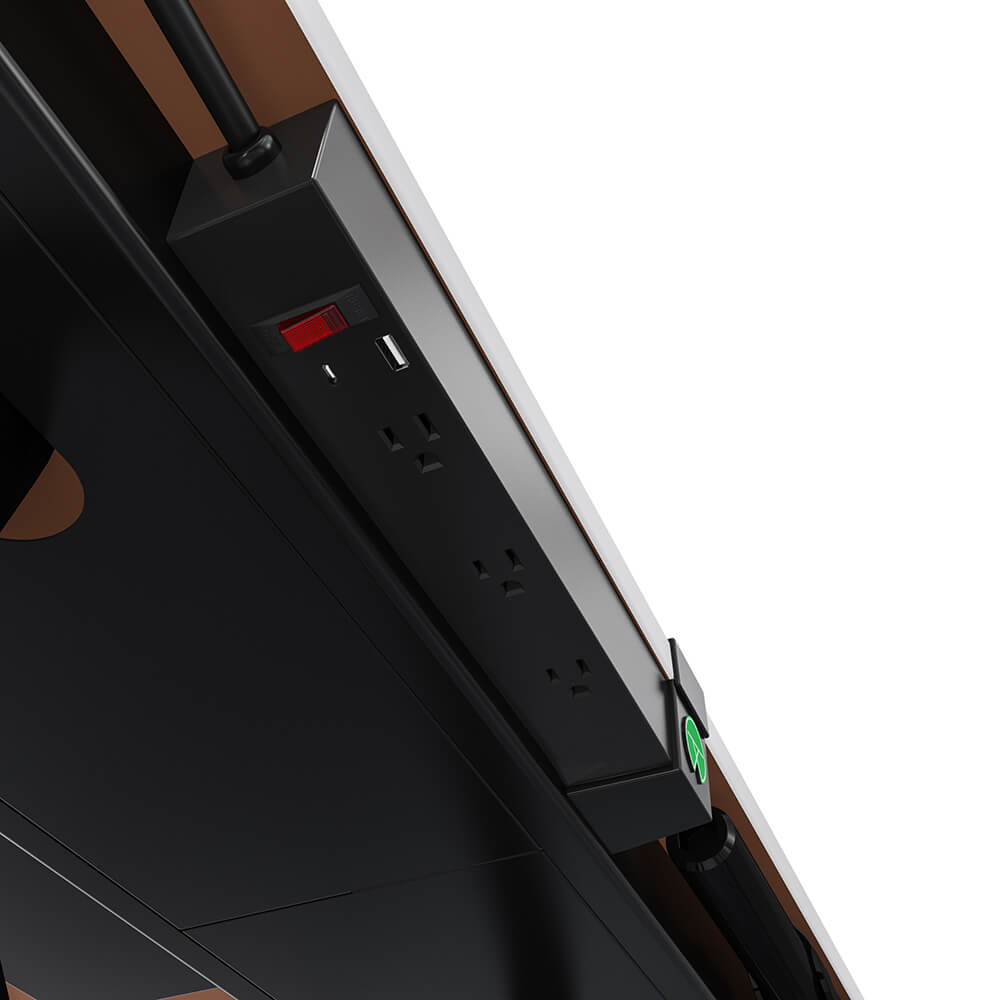
On a fixed desk, cable management is housekeeping. On a height adjustable desk it is a functional requirement, because every cable has to survive eighteen inches or more of travel, twice a day, for years.
A standing desk with cable management built into the frame solves a problem that adhesive cable clips cannot. Here is what actually goes wrong, and what a good cable management system has to do on a desk that moves.
What Height Adjustment Does to a Cable
Raise an electric standing desk from seated to standing height and every cable running to the floor gets shorter by that distance. If the slack is not already there, something has to give.
Three failures follow, in roughly this order:
- The cable pulls tight. The desk stops short, or the plug strains at the socket.
- Something unplugs. Usually the monitor, usually mid-task.
- The cable fails at the bend. Repeated flexing at one point breaks conductors inside the jacket long before the outside looks damaged.
That last one is the reason this matters beyond appearance. A desk cable that flexes at the same point four times a day is being fatigue-tested, and the failure is gradual and invisible until it is not.
The Slack Loop Is the Whole Trick
Good cable management on a sit stand desk is not about hiding wires. It is about controlling where the slack lives and where the bend happens.
The rule is simple. Every cable leaving the desktop should travel horizontally along the frame first, gather its slack in one managed loop, and only then drop to the floor from a single point. Done that way, raising the desk pays out the loop instead of pulling at the plug, and the bend is spread across a curve rather than concentrated at one crease.
How much slack? Measure the full height range of the desk and add a third. A desk travelling from 29 to 47 inches needs at least 18 inches of slack, and 24 is comfortable.
Built In Versus Bolted On
Most desk cable management sold as an accessory was designed for a desk that does not move.
| Solution | Holds up on a moving desk | Note |
|---|---|---|
| Adhesive cable clips | Poorly | Adhesive fails on repeated tension |
| Cable sleeve or wrap | Partly | Tidy, but bundles the bend into one stiff point |
| Under-desk cable tray | Well | Holds the slack loop where you want it |
| Grommet in the tabletop | Well | Gets cables off the surface at the source |
| Power strip on the frame | Best | Reduces five cables to one |
The last row is the one that changes the problem rather than managing it. If the power strip rides on the desk leg, then the monitor, the laptop charger, the lamp and the USB hub all plug into something that travels with the desk. Only one cord organization problem is left: the single lead from desk to wall.
That is a genuinely different situation from routing five cables individually, and it is why a desk with a power outlet on the frame is worth more than any add-on cable organizer.
A Working Order for the Setup
Twenty minutes, once, in this order
Do it in this sequence and it takes about twenty minutes once.
- Raise the desk to its highest working height first. Cable it there, and every lower position has slack by definition.
- Mount the power strip to the frame or the underside, not on the floor.
- Put the monitor on an arm. The screen cables then run down the arm and along the frame instead of across the tabletop.
- Route along the frame horizontally, then down once. One drop point, not four.
- Leave the drop at the back corner nearest the wall socket, so the run across open floor is as short as possible.
- Cycle the desk through its full height range twice and watch for anything pulling.
That last step catches almost every mistake. A setup that looks perfect at standing height often binds at the bottom of the height range, where the slack has nowhere to go.
What to Look For on the Spec Sheet
Cable management is rarely described in detail, so a few specific words in a listing tell you more than the photographs.
| What the listing says | What it means in practice |
|---|---|
| "Cable management included" | Often a bag of clips. Check for a tray |
| "Integrated power strip" | The real thing. One lead to the wall |
| "Grommet" or "cable port" | Cables leave the tabletop cleanly |
| "USB C" or "charging port" | One fewer charger on the surface |
| "Steel frame" | A desk leg you can actually mount a tray to |
| "Easy assembly" | Routing is usually left entirely to you |
The difference shows up most on desks with a lot of hardware. A gaming desk with LED lighting, an executive desk with a lamp and a phone charger, or an L-shaped office desk with a second monitor all multiply the number of runs. A quality desk with a frame-mounted strip handles that; a fixed computer desk with a single cable port does not, and you end up buying desk accessories to patch the gap.
Ethernet deserves a mention. If you run a wired connection, it is the least flexible cable at the desk and the first to complain about height adjustability, so give it the most slack in the loop.
Cable Chaos Is a Reason People Stop Adjusting
This is the part that connects cable management to whether the desk earns its price.
If raising the desk drags a bundle of cords across the floor or risks unplugging a monitor, you raise it less. And the benefit of a height adjustable desk depends entirely on using the height adjustment. In the Take-a-Stand Project, published in Preventing Chronic Disease, office workers given sit-stand devices cut sitting time by 66 minutes a day and reported 54 percent less upper back and neck pain , and every one of those gains disappeared within two weeks of the devices being removed.
Friction has the same effect as removal, just slower. A desk that is annoying to raise becomes a fixed desk that cost more.
Safety, Briefly
Two things are worth getting right on any home office desk setup.
Keep power leads out of walking routes. A cable crossing the floor between a desk and a socket is the most common trip hazard in a home office, and it is worse when the desk moves and the cable position changes with it. And do not chain one power strip into another to reach the wall; use a single strip rated for the load.
Workstation layout is part of the same picture. NIOSH lists awkward posture and poor workstation design among the contributors to work-related musculoskeletal disorders, and reaching around a cable bundle to get to a keyboard is exactly the kind of small daily compromise that adds up.
What Good Looks Like
A desk with cable management done properly has one cord leaving it, no cables visible on the tabletop, and no tension anywhere in its height range. Nothing needs unplugging to move the desk, and nothing needs re-routing when you change position.
The Lillipad is built to that pattern. A built-in power strip with 2 USB ports rides on the frame alongside integrated cable management and a monitor mount, so the desk carries its own electrical run. Its working height runs from 13.5 inches up to 42 inches on the standard size and 48 inches on the large, it stores two height presets, and folds flat when the working day ends, which is the one situation where cable discipline stops being optional.
For the rest of the home office setup, our WFH desks page covers layout and sizing, and the electric standing desks page lists the full specifications.
Frequently Asked Questions
How much cable slack does a standing desk need?
At least the full height range, plus about a third. A desk travelling 18 inches wants 24 inches of managed slack so nothing pulls at the top of its travel.
Do adhesive cable clips work on a height adjustable desk?
Poorly. They are designed for static runs, and the repeated tension of a moving desk lifts them off, usually taking some finish with them. A tray or a frame-mounted strip is the durable answer.
Should the power strip go on the desk or the floor?
On the desk. A strip mounted to the frame means one cable travels to the wall instead of five, and nothing gets pulled tight when the desk rises.
What is a desk grommet for?
A grommet is a lined hole in the tabletop that lets cables pass straight down through the surface instead of over its edge. It removes the sharpest bend in the run and keeps the desktop clear.
Upgrade Your Workspace With Lillipad, Order Today!
At Lillipad, we’ve reimagined the standing adjustable desk with the greatest ergonomic range ever. Our height-adjustable standing desks let you seamlessly switch between sitting and standing positions, so you can move freely and protect your posture.
- Products & Services: From home office setups to in-office standing desks, Lillipad offers electric sit stand desks, adjustable standing desks, and ergonomic desktops with integrated power and memory presets. Each model is designed with industrial-grade lifting columns, wide height ranges, and wood desktop finishes that fit any workspace.
- Quality & Comfort: Built in Milwaukee, WI, our height adjustable electric standing desks are made to last, with anti-collision safety, quick assembly, and lifetime durability. Whether you need a small desk, 48-inch tabletop, or a spacious one-piece wooden desktop, our solutions work for sitting and standing throughout the day.
How to Order?
Explore our collection, shop standing desks, and configure your customizable options directly at www.lillipad.com. Have questions? Reach out through our website, we guarantee industry-leading support and a 60-day return policy.
Take control of your health, productivity, and comfort. Choose Lillipad ergonomic standing desks and transform your workday today.

Ready to Upgrade Your Workspace?
Experience the #1 rated foldable standing desk for small spaces
Shop Lillipad Now