
Sit to Stand Desks

What Is a Sit to Stand Desk?
A sit to stand desk is a height-adjustable workstation that moves vertically so you can work while seated or standing. You set the desk to your ideal sitting height for focused work, then raise it to standing height when you need a change. The best sit to stand desks use electric motors so the transition happens at the push of a button with no physical effort.
Sit to stand desks are also called height-adjustable desks, adjustable standing desks, or stand up desks. They all describe the same core function - a desk surface that moves up and down to support multiple working positions.
What makes a sit to stand desk different from a fixed standing desk is flexibility. A fixed standing desk forces you to stand all day, which creates its own set of problems. A sit to stand desk gives you the freedom to choose your position based on how your body feels at any given moment.

Why Use a Sit to Stand Desk?
The average office worker sits for more than 10 hours per day. That includes desk time, commuting, meals, and evening screen time. Prolonged sitting compresses the spine, tightens hip flexors, reduces circulation, and increases the risk of chronic health issues over time.
A sit to stand desk doesn't eliminate sitting. It breaks up long stretches of it with standing intervals that keep your body moving and your blood flowing.
Reduce Lower Back Pain
Lower back pain is the most common complaint among desk workers. When you sit for hours, your lower back absorbs constant compression. Standing redistributes that load across your legs, hips, and core. Alternating between sitting and standing throughout the day gives your lower back regular relief instead of forcing it to support your upper body for 8+ hours straight.
Improve Energy and Alertness
Standing naturally increases blood flow and oxygen delivery to your brain. Many sit to stand desk users report feeling more alert and productive, especially in the afternoon when energy typically drops. The physical act of standing up triggers a subtle shift in attention that can break through mental fatigue.
Increase Daily Movement
You don't need to hit the gym to benefit from more movement. Simply standing for portions of your workday adds meaningful physical activity. When you stand, you naturally shift your weight, adjust your posture, and move more than when seated. Over weeks and months, these small movements add up to significantly less sedentary behavior.
Build Better Posture Habits
A sit to stand desk set to the correct height positions your monitor at eye level, your elbows at 90 degrees, and your wrists in a neutral position. These are the foundations of good posture. With memory presets, you lock in those positions and return to them every time you switch, reinforcing healthy posture habits throughout the day.
Who Should Use a Sit to Stand Desk?
Sit to stand desks aren't just for corporate offices. They're used by a wide range of people across different work styles and environments.
Remote Workers
Working from home often means working from whatever surface is available - a dining table, a kitchen counter, a couch. None of these support proper posture for a full workday. A sit to stand desk creates a real ergonomic workstation at home, and if you choose a model that folds or rolls, it doesn't have to take up permanent space.
Developers and Programmers
Long coding sessions demand sustained focus. Developers who use sit to stand desks report fewer breaks in concentration because standing reduces the physical discomfort that pulls attention away from the screen. The ability to change positions without leaving the workstation keeps flow states intact.
Creative Professionals
Designers, video editors, writers, and content creators spend hours at their desks. A sit to stand desk introduces physical variety that keeps creative energy flowing. Many creatives find that standing sparks a different kind of thinking - more active, more experimental - compared to seated work.
Students
Long study sessions create the same posture problems as long work sessions. A sit to stand desk helps students maintain focus and reduce physical strain during exam prep, research, and writing. For dorm rooms and small bedrooms, compact or foldable sit to stand desks maximize limited space.
People with Back Pain or Chronic Discomfort
If sitting aggravates your back, hips, or neck, a sit to stand desk gives you an alternative without leaving your workstation. Many physical therapists and ergonomic consultants recommend sit to stand desks for patients dealing with chronic sitting-related discomfort.
Sit to Stand Desk Models and Capabilities
GO Sit to Stand Desk
Electric height adjustment from 6 to 48 inches
Two programmable memory presets
Safety lock and collision detection
Integrated USB ports
Heavy-duty rolling wheels
PRO Sit to Stand Desk
Includes all GO features, plus:
Integrated surge protector with AC and USB ports
Support for single or dual monitor arms
Cable concealment panels
Cable management net
Cost and Long-Term Value of a Sit to Stand Desk
Lillipad sit to stand desks start at $869 depending on size and configuration. While entry-level desks may cost less, many lack stability, durability, or long-term warranty support.
A well-built sit to stand desk provides lasting ergonomic value, reduced physical strain, and improved work efficiency over time.
Sit to Stand Desks for Remote and Hybrid Work
A sit to stand desk is especially valuable for remote and hybrid workers who lack a dedicated office setup. Many people rely on dining tables or temporary surfaces, which creates poor posture and inconsistent ergonomics.
A sit to stand desk allows users to create a stable, ergonomic workstation in any room and store it away when not in use. This flexibility supports healthier work habits without permanent space requirements.
Why a Sit to Stand Desk Is a Practical Investment
A sit to stand desk supports productivity, health, and long-term comfort. By allowing movement throughout the workday, it reduces fatigue and improves focus.
Lillipad sit to stand desks combine ergonomic engineering, durability, and adaptable design to support modern work environments.
For users seeking a reliable sit to stand desk that adapts to real-world use, Lillipad delivers a focused ergonomic solution.
How to Choose the Right Sit to Stand Desk
Height Range
The height range determines what positions the desk supports. Most sit to stand desks adjust between 27" and 48", which covers standard sitting and standing for users between 5'2" and 6'2". If you're shorter, taller, or want floor sitting capability, look for desks with a wider range. The Lillipad adjusts from 6" to 48" - the widest range available in any sit to stand desk.
Adjustment Mechanism
Electric sit to stand desks adjust with a motor at the push of a button. Manual models use a hand crank or pneumatic lever. Electric models are faster, easier, and more likely to be used regularly because they remove the physical effort of adjustment. If you want to actually sit and stand throughout the day (not just set it once), electric is the way to go.
Stability
A sit to stand desk must be stable at every height, especially at full standing extension. Look for desks with wide bases, cross-braced frames, or X-frame geometry. Check for UL962 certification, which includes stability and tip testing. If possible, read reviews that specifically mention stability at standing height - that's where most weak desks fail.
Desktop Size
Match the desktop to your equipment. A 46" wide surface handles a single monitor, laptop, and standard accessories comfortably. Dual monitor setups typically need 52" or wider. Depth matters too - 24" is the minimum for most monitor setups, and 30" gives you more distance between your eyes and the screen.
Portability and Storage
Traditional sit to stand desks are permanent fixtures. If your workspace needs to flex - shared rooms, small apartments, multipurpose spaces - look for sit to stand desks with wheels or folding capability. The Lillipad combines full sit to stand functionality with a foldable frame that collapses to 6 inches and rolls on integrated wheels.
Sit to Stand Desk vs Other Desk Types
Sit to Stand Desk vs Fixed Desk
A fixed desk locks you into one height. If that height doesn't match your body proportions, you compensate with poor posture. A sit to stand desk adjusts to your body instead of forcing your body to adjust to it. The ability to switch positions also reduces the physical fatigue that accumulates during long sessions at a fixed height.
Sit to Stand Desk vs Standing Desk Converter
A converter sits on top of an existing desk and raises your keyboard and monitor to standing height. Converters are cheaper than full sit to stand desks, but they take up desk space even when lowered, offer limited height adjustment, and can be unstable at full extension. A full sit to stand desk provides a cleaner setup, wider height range, and better long-term ergonomics.
Sit to Stand Desk vs Treadmill Desk
Treadmill desks add walking to the workday. They're great for light tasks like reading email or taking calls, but most people find it difficult to do focused work like writing or coding while walking. A sit to stand desk supports the same range of tasks you'd do at any desk while still introducing meaningful movement through position changes.
How to Transition to a Sit to Stand Desk
Switching to a sit to stand desk works best when done gradually. Jumping straight to standing for 4 hours will leave your feet, legs, and lower back sore. Build the habit over 2-3 weeks.
Week 1
Stand for 15-20 minutes at a time, 2-3 times per day. Sit for the rest. Focus on finding your ideal standing height and saving it as a memory preset.
Week 2
Increase standing intervals to 30 minutes. Aim for 3-4 standing sessions per day. Start pairing specific tasks with standing - calls, brainstorming, and lighter work tend to feel natural while standing.
Week 3 and Beyond
Work toward a rhythm that feels natural. Most experienced sit to stand desk users settle into 45-60 minutes sitting followed by 20-30 minutes standing. There's no perfect ratio. The goal is regular movement, not maximum standing time.
Tips for Comfort
- Use an anti-fatigue mat when standing on hard floors
- Wear supportive shoes or go barefoot on the mat
- Shift your weight between feet and avoid locking your knees
- Keep a slight bend in your knees when standing
- Position your monitor so you don't tilt your head up or down
The Lillipad Sit to Stand Desk
Most sit to stand desks go from chair height to standing height. The Lillipad goes further - from 6 inches (floor sitting) to 48 inches (full standing). That gives you three working positions instead of two: floor, chair, and standing.
- 6" to 48" height range: The widest range of any sit to stand desk on the market.
- Three working positions: Floor sitting, chair sitting, and standing in one desk.
- Folds flat to 6 inches: Stores under beds, behind couches, or in closets when not in use.
- No assembly: Ships fully built. Open the box and start working.
- Integrated wheels: Roll between rooms on any floor surface.
- Built in Milwaukee, Wisconsin: Industrial-grade steel frame, UL962 certified, static load tested to 700 lbs.
- 60-day money back guarantee and 5-year warranty.
Sit to Stand Desk FAQ
What is the difference between a sit to stand desk and a standing desk?
A standing desk is designed primarily for standing work. A sit to stand desk adjusts between sitting and standing heights so you can alternate throughout the day. Sit to stand desks are more versatile because they support both positions instead of committing you to one.
How often should I switch between sitting and standing?
Most ergonomic guidelines recommend switching every 30-60 minutes. Start with shorter standing intervals (15-20 minutes) and build up over 2-3 weeks. The key is regular movement, not maximizing standing time.
Are sit to stand desks good for back pain?
Yes. Alternating between sitting and standing reduces the sustained compression on your lower spine that causes most sitting-related back pain. Many physical therapists recommend sit to stand desks for patients with chronic lower back discomfort. If you have a specific injury or condition, consult your doctor before making changes to your work setup.
Can I use a sit to stand desk with a floor chair or cushion?
Only if the desk goes low enough. Most sit to stand desks have a minimum height of 27", which is too high for floor sitting. The Lillipad adjusts down to 6 inches, making it the only sit to stand desk that fully supports floor sitting with a cushion, meditation seat, or cross-legged position.
How much does a sit to stand desk cost?
Manual sit to stand desks start around $200-$400. Electric sit to stand desks range from $400-$1,300 depending on motor type, build quality, and features. The Lillipad starts at $887 for the GO model and $997 for the PRO, both with free shipping included.
Do sit to stand desks really improve productivity?
Research suggests that sit to stand desk users report higher energy levels, less discomfort, and improved focus compared to fixed desk users. The productivity gain comes from reduced physical fatigue and the mental refresh that happens when you change positions. Standing doesn't make you work faster, but it helps you sustain focus for longer periods.
What does remote work really look like outside the office?
This is a question that many employers tend to avoid as they must face the reality of unproductive remote setups which lack ergonomics.
Glamour shots of beautiful home offices are simply a fantasy for most remote workers. Majority of remote workers are using dining room tables, kitchen counters, coffee tables etc as a long-term solution.
Poor ergonomics are combined with a “bird’s nest” of cables, extension cords and monitors set on boxes or stacked on books. These unproductive, unhealthy and often unsafe solutions are unsustainable for a long-term remote and hybrid workforce. A 3in/2out hybrid model puts workers in this environment for 40% of the year.
Addressing this challenge is a daunting task, but leading companies are realizing that strategic support of remote work has a quick ROI in productivity while playing a key role in recruiting and retaining talent.
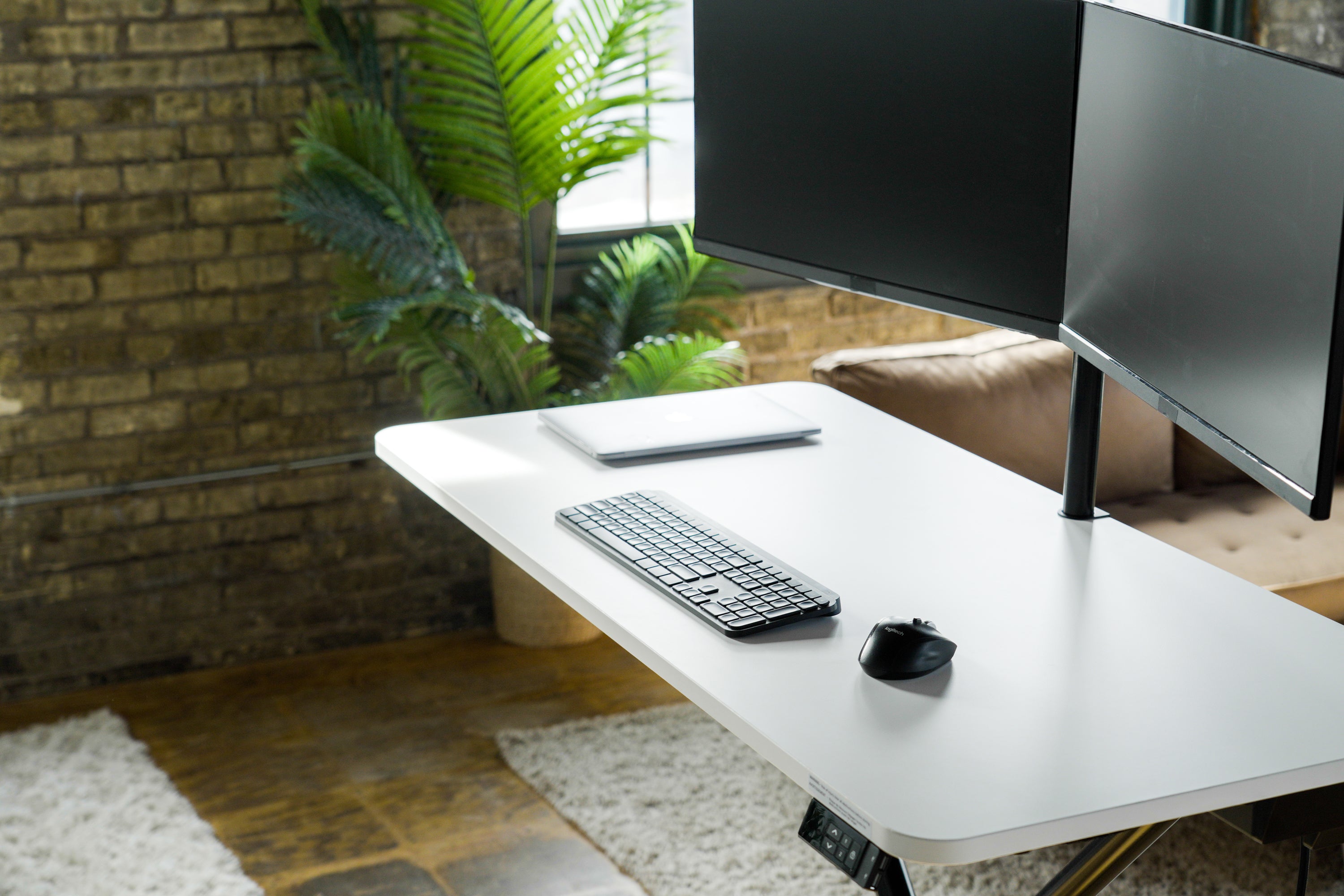
Lillipad offers employers a turnkey solution to support their teams while influencing an unwieldy remote work environment.
Our workstation is a full-sized, ergonomic standing desk for remote workers who do not have space for a dedicated home office. Employees can set up and work from any room without the need for a heavy, permanent desk.
Lillipad’s patent-pending technology makes us the only height-adjustable table with the flexibility to work in any home environment. Users can collapse their Lillipad when it's time for life away from work. Lillipad ships fully assembled to your employee’s door, eliminating the hassle with tools, complicated instructions, and time-consuming assembly. Simply take it out of the box, plug it in, press a button and your team will be working almost instantly.
We enable you to activate a hassle-free, cost-efficient remote and hybrid support program at scale. By placing an emphasis on the success and well-being of your employees, Lillipad will increase productivity, lift morale and build culture within your organization, making remote and hybrid work a progressive part of who you are.
Benefits of Investing In Lillipads For Your Remote Teams



Interested in Lillipads for your team?
Lillipad is the world's only solution that enables companies to impliment productive & ergonimic workstations at scale.
The proven increase in user productivity has created an extreme demand for company bulk orders. Complete the form below and our team will contact you ASAP!